
 Cravio AI
AI Order Entry for Wholesalers in Australia: Email and PDF Orders to Sales Orders Without Changing ERP
It's 7:30 on a Monday and the order inbox is full. One customer has attached a PDF purchase order, another has pasted a list into the email body, a third has sent a spreadsheet with their own product codes, and someone has photographed a handwritten sheet. Each one has to be read and retyped before picking can start.
AI order entry for wholesalers in Australia is about removing that retyping without asking customers to change how they order or asking you to replace your ERP. This guide covers how it works, what it connects to, where it falls short, and how to pilot it. It's one of the AI agents we build for Australian manufacturers, wholesalers and distributors.
Why manual order entry hurts wholesalers
Retyping orders isn't hard, but it's slow, repetitive and rushed, which is where mistakes creep in. Common problems include:
- Customer codes vs your codes. A customer orders "BRK-500" from their own purchasing system, and someone has to know that it's your SKU 10423.
- Units and pack sizes. "2 ctn" might mean 2 cartons of 12 or 24 eaches, depending on the customer.
- Free text. "Same as last week but double the gloves" makes sense to a person and to nothing else.
- Timing pressure. Orders pile up before cut-off and after weekends.
Portals and EDI help, but the difficulty is the long tail of customers who will keep sending emails and PDFs no matter what. Several Australian wholesale software vendors now build their AI order features around exactly this point: customers keep ordering the way they always have (Open Pantry, Fresho).
What AI order entry for wholesalers in Australia actually does
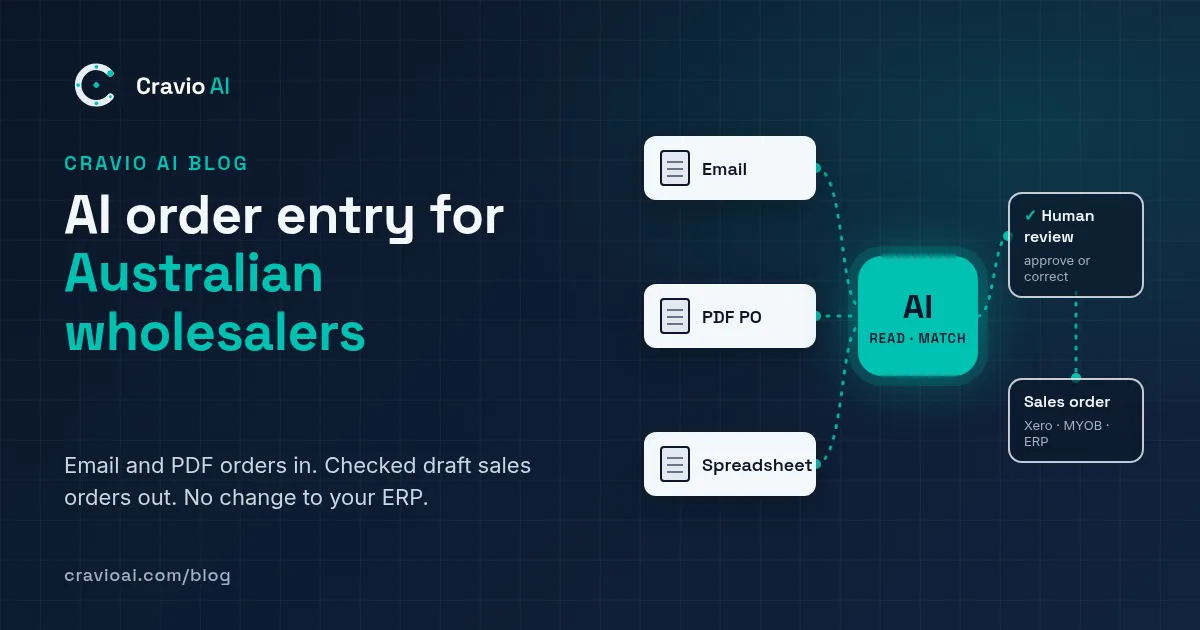
AI order entry (also called AI order processing or email order automation) uses AI models to read an unstructured order and turn it into a structured draft sales order. A well-built setup does five jobs.
1. Reads the order wherever it arrives
It reads the email body, attached PDFs, Word documents, Excel or CSV files and, with an extra step, scanned or photographed order sheets. The same idea applies when you automate purchase order processing for customer POs: the PO is simply another document to read.
2. Extracts the header and line items
From each order it pulls out the customer, PO number, delivery address, requested delivery date and every line: product description or code, quantity, unit and any quoted price.
3. Matches customers and products
This is where most of the value sits. The AI matches the sender to a customer account, then matches each line to your product list using your SKUs, the customer's own codes, descriptions and their order history. Vendors in this space describe the same approach, for example favouring exact past matches and recent order history (Fresho Help Center).
4. Validates against your business rules
The draft is checked against rules you define:
- Is the SKU active and sellable?
- Does the price match the customer's price list or contract price?
- Is the quantity a valid multiple of the pack size?
- Has the order arrived after cut-off?
- Is this a duplicate of an order already entered?
5. Puts a human check before anything is posted
Uncertain or rule-breaking lines are flagged, and a person approves the draft alongside the original email or PDF. Only then does the order go into your system.
A realistic step-by-step workflow
Here's a typical flow for a distributor on Xero or MYOB (with or without an inventory app) or a mid-sized ERP.
- Capture. Orders go to a shared address such as [email protected], or are forwarded there automatically by an email rule.
- Classify and extract. The AI separates orders from other emails (delivery queries, remittances, spam), then pulls out header details and line items.
- Match. The customer is matched to their account and each line to a SKU. Anything below a confidence threshold is flagged rather than guessed.
- Validate. Prices, pack sizes, stock status, cut-offs and duplicates are checked.
- Review. A team member sees the draft beside the original message, fixes anything flagged and approves. Corrections can be saved as new mappings, so "BRK-500" is matched automatically next time.
- Post. The approved order goes to your ERP, inventory system or accounting software through an existing integration or a file import.
- Log. Every step is recorded so you can see what the AI suggested, what a person changed and who approved it.
What it works with (without changing your ERP)
The main point is that AI order entry sits in front of the systems you already use. It doesn't replace them. How the order gets in depends on the system.
Xero
Many wholesalers on Xero run a separate inventory and order app alongside it. For Xero itself:
- CSV import. Xero lets you import customer invoices from a CSV template. They come in as drafts that you approve or edit, dates use DD/MM/YYYY, and the tax rate must match your settings exactly, for example "GST on Income" (Xero Central).
- API. Xero's Accounting API lets connected apps create invoices, including as drafts (Xero Developer).
Inventory and order apps that connect to Xero
If you use an app such as Unleashed or Cin7, the sales order usually belongs there, not in Xero. Unleashed publishes an API for creating sales orders (Unleashed API docs), and Cin7 Core notes that sale orders aren't synced to Xero; invoices are (Cin7 Core Help). The AI should therefore post to the order system and let your existing sync handle accounting. Connecting to the system you already run is the kind of integration work covered by our custom AI solutions.
MYOB
- AccountRight can import sales from tab-delimited or comma-separated text files (MYOB support). In an item sales import, setting the Sale Status field to "O" brings transactions in as orders rather than invoices (MYOB Community).
- MYOB Business (browser) didn't support importing sales through its built-in import tool at the time of a community discussion, so the MYOB Business API is the usual route (MYOB Community, MYOB Developer).
Larger ERPs
Mid-market ERPs generally offer an API, an import format or both. The practical question is simple: can we create a sales order from outside the system, and in what format? Your ERP partner can usually answer that quickly.
GST and AUD details to get right
Prices on customer POs may be GST-inclusive or GST-exclusive, and Xero's import makes you choose one or the other for the whole file (Xero Central). The AI needs a clear rule here. Your tax invoices still have to meet ATO requirements, such as showing the buyer's identity or ABN on sales of $1,000 or more (ATO).
Benefits and limits: an honest view
What you can reasonably expect
- Less retyping. Staff review and correct orders instead of keying every line.
- Consistent checks. Price, pack-size and duplicate checks run on every order, not just when someone remembers.
- Faster turnaround. Drafts can be ready when staff arrive, rather than queuing until someone is free.
- Less key-person risk. Customer shorthand lives in mapping tables, not one person's head.
- An audit trail. You can see where every order line came from.
We won't quote a percentage time saving: it depends on your order mix, data quality and systems, which is why you measure it in a pilot.
Where it falls short
- It isn't 100% accurate. Generative AI can produce wrong outputs that look convincing. Australia's privacy regulator says AI systems "are known to produce inaccurate or false results" and recommends human oversight of outputs (OAIC).
- Messy inputs stay hard. Poor scans, handwriting and vague requests ("the usual") will need a person more often.
- Your data matters. If your product list has duplicate or outdated SKUs, matching will suffer. Cleaning it up is often part of the project.
- It needs upkeep. New products, customers and price lists must flow into the matching data.
Why human review isn't optional
The National AI Centre's Guidance for AI Adoption includes "maintain human control" as one of its six essential practices, so that people can oversee AI systems and intervene when something goes wrong. For order entry, that means a person approves orders, at least until you have evidence that certain low-risk order types can safely go straight through. It was released in October 2025 with templates for businesses new to AI (business.gov.au).
Privacy is relevant too. Orders often contain names, phone numbers and addresses. The OAIC recommends due diligence on any AI product, including who can access the data you put in, and advises against entering personal information into publicly available generative AI tools (OAIC). Use a business-grade setup with clear data terms, not a free chatbot.
When it's worth it vs off-the-shelf tools
There is a growing category of off-the-shelf AI order entry tools, many built into wholesale ordering platforms. In Australia these include food and beverage platforms such as Fresho, Open Pantry and FOBOH. If you already use, or are happy to adopt, one of these platforms and it suits your products, it may be the simplest option.
A custom setup tends to make more sense when:
- you sell outside the industries those platforms focus on (industrial supplies, packaging, parts, building products and so on)
- you want to keep your current ERP or inventory system as the single source of truth
- your orders arrive in unusual formats, or follow complicated pricing and pack rules
- you want order entry connected to other workflows, such as stock checks or customer replies
It's probably not worth it yet if you handle a handful of orders a week, or most customers already use a portal or EDI.
How to start: a small, measured pilot
- Measure your baseline. For two weeks, record how many emailed orders you receive and roughly how long each takes to enter, from opening the email to saving the order. Include time spent fixing errors.
- Pick a narrow scope. Choose 5 to 10 customers with regular emailed or PDF orders.
- Gather samples. Collect 50 to 100 past orders and their correct entered versions to test against.
- Run in "shadow mode". The AI produces drafts while staff keep entering orders as normal. Compare the two.
- Track three numbers: minutes per order (including review), the share of lines needing correction, and errors that made it through.
- Decide. Expand, adjust or stop based on what you measured, not on a demo.
FAQ
Do my customers need to change how they order?
No. The point of email order automation is that customers keep sending emails, PDFs and spreadsheets as they do now. The change happens on your side.
Will it work with Xero or MYOB?
Usually, yes, through an API or a file import. Xero supports CSV import of draft invoices and an API, and MYOB AccountRight can import sales as orders. If you run an inventory app such as Unleashed or Cin7, orders normally go there first.
How accurate is AI order processing?
It depends on your data and order formats, which is why a pilot with your own historical orders matters. Plan for a person to review drafts, especially early on.
Is it safe to send customer orders through AI?
It can be, with the right setup. Check where the data is processed and stored, who can access it, and whether it's used to train models, in line with OAIC guidance.
Find out if it's a fit for your order desk
Cravio AI is a Canberra-based consultancy that builds custom AI order entry and automation for Australian manufacturers, wholesalers and distributors, working with the systems you already have. If you'd like an honest view of whether it would pay off for your business, request a free AI Opportunity Audit or book a free 30-minute call. We'll look at how your orders arrive, where they need to go, and what a small pilot could look like.
Sources
- Import customer invoices (Xero Central, Australia)
- Accounting API: Invoices (Xero Developer)
- The 3 most effective ways to cut admin time using Fresho (Fresho Help Center)
- Sync sales with Xero (Cin7 Core Help)
- Sales Orders API (Unleashed Software API docs)
- Importing and exporting data (MYOB AccountRight support)
- Importing orders: Sale Status field (MYOB Community)
- Importing invoices to MYOB Business (MYOB Community)
- MYOB Business API (MYOB Developer)
- Tax invoices (Australian Taxation Office)
- Guidance on privacy and the use of commercially available AI products (OAIC)
- Guidance for AI adoption: implementation practices (National AI Centre)
- New guidance helps Australian businesses adopt AI safely and responsibly (business.gov.au)
- Automate my orders: OrderPilot (Fresho)
- AI Order Entry Software for Food Wholesalers (Open Pantry)
- AI agents for wholesale (FOBOH)